

he Nanobanana Integration brings advanced AI image editing and generation capabilities to MagicAI through Fal AI’s Nanobanana model. With this feature, you can edit images or generate new ones directly from the AI Image Editor.
How to Set Up Nanobanana Integration
Step 1: Install Nanobanana from the Marketplace
Go to the MagicAI Marketplace and install Nanobanana.
Step 2: Get Your API Key
Visit the Fal AI Console and generate your API Key.
Step 3: Enter Your API Key in MagicAI
Go to API Integration > FAL AI from your MagicAI dashboard.
Paste your API Key into the API Key field and click Save.
Step 4: Set Nanobanana as Default in AI Image Editor
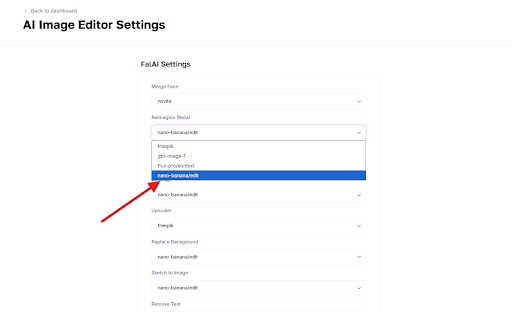
From your MagicAI dashboard, go to Settings > AI Image Editor Settings.
Select Nanobanana as your default model for your preferred editing features.
Step 5: Start Editing and Generating Images with AI
Head over to the AI Image Editor in MagicAI.
You’ll now have access to Nanobanana’s AI features, such as:
- Image Editing – background removal, upscaling, inpainting, and more.
- Image Generation – create new images instantly by entering a text prompt in AI Image
Important Note
💳 Make sure your MagicAI account has enough credits to use Nanobanana’s features.